Steam
Store data
- UK price
- £22.49
- US price
- $21.24
- Positive reviews
- 91%
- Total reviews
- 103
- Release date
- 23 September 2026
SteamWatch’s first observed day and week; tracking can begin after release. Top Sellers is Steam’s revenue ranking, not a sales estimate.
1 player-data day recorded in this window.
7 player-data days recorded in this window.
24-hour and 7-day views use hourly peaks from ten-minute samples. Longer views use retained daily peaks. Up to 24 recent event markers are shown per layer.
| Month | Peak | Gain | % gain | Average | Avg % gain |
|---|---|---|---|---|---|
| Last 30 days | 230 | — | — | 80 | — |
| October 2026 | 149 | -81 | -35.2% | 66 | -43.0% |
| September 2026 | 230 | — | — | 117 | — |
| Region | Currency | Regular | Current | Discount | Historical low | Last change |
|---|---|---|---|---|---|---|
| United KingdomGBP · GB | GBP | £22.49 | £19.11 | 15% | £19.11 | No change recorded |
| United StatesUSD · US | USD | US$24.99 | $21.24 | 15% | $21.24 | No change recorded |
| Euro areaEUR · DE | — | — | Unavailable | — | — | No change recorded |
| United Arab EmiratesAED · AE | — | — | Unavailable | — | — | No change recorded |
| AustraliaAUD · AU | — | — | Unavailable | — | — | No change recorded |
| BrazilBRL · BR | — | — | Unavailable | — | — | No change recorded |
| CanadaCAD · CA | — | — | Unavailable | — | — | No change recorded |
| SwitzerlandCHF · CH | — | — | Unavailable | — | — | No change recorded |
| ChileCLP · CL | — | — | Unavailable | — | — | No change recorded |
| ChinaCNY · CN | — | — | Unavailable | — | — | No change recorded |
| ColombiaCOP · CO | — | — | Unavailable | — | — | No change recorded |
| Costa RicaCRC · CR | — | — | Unavailable | — | — | No change recorded |
| Hong KongHKD · HK | — | — | Unavailable | — | — | No change recorded |
| IndonesiaIDR · ID | — | — | Unavailable | — | — | No change recorded |
| IsraelILS · IL | — | — | Unavailable | — | — | No change recorded |
| IndiaINR · IN | — | — | Unavailable | — | — | No change recorded |
| JapanJPY · JP | — | — | Unavailable | — | — | No change recorded |
| South KoreaKRW · KR | — | — | Unavailable | — | — | No change recorded |
| KuwaitKWD · KW | — | — | Unavailable | — | — | No change recorded |
| KazakhstanKZT · KZ | — | — | Unavailable | — | — | No change recorded |
| MexicoMXN · MX | — | — | Unavailable | — | — | No change recorded |
| MalaysiaMYR · MY | — | — | Unavailable | — | — | No change recorded |
| NorwayNOK · NO | — | — | Unavailable | — | — | No change recorded |
| New ZealandNZD · NZ | — | — | Unavailable | — | — | No change recorded |
| PeruPEN · PE | PEN | PEN 59.99 | S/.50.99 | 15% | S/.50.99 | No change recorded |
| PhilippinesPHP · PH | PHP | ₱749.00 | P636.65 | 15% | P636.65 | No change recorded |
| PolandPLN · PL | PLN | PLN 104.99 | 89,24 zł | 15% | 89,24 zł | No change recorded |
| QatarQAR · QA | — | — | Unavailable | — | — | No change recorded |
| RussiaRUB · RU | — | — | Unavailable | — | — | No change recorded |
| Saudi ArabiaSAR · SA | — | — | Unavailable | — | — | No change recorded |
| SingaporeSGD · SG | — | — | Unavailable | — | — | No change recorded |
| ThailandTHB · TH | — | — | Unavailable | — | — | No change recorded |
| TaiwanTWD · TW | — | — | Unavailable | — | — | No change recorded |
| UkraineUAH · UA | — | — | Unavailable | — | — | No change recorded |
| UruguayUYU · UY | — | — | Unavailable | — | — | No change recorded |
| VietnamVND · VN | — | — | Unavailable | — | — | No change recorded |
| South AfricaZAR · ZA | — | — | Unavailable | — | — | No change recorded |
| CIS (regional USD)USD_CIS · AM | — | — | Unavailable | — | — | No change recorded |
| Latin America (regional USD)USD_LATAM · AR | — | — | Unavailable | — | — | No change recorded |
| Middle East & North Africa (regional USD)USD_MENA · EG | — | — | Unavailable | — | — | No change recorded |
| South Asia (regional USD)USD_SASIA · PK | — | — | Unavailable | — | — | No change recorded |
Recent views use Steam's daily review activity. Longer views use weekly totals, retained by SteamWatch.
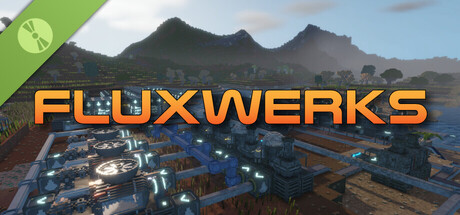
The terrain in FluxWerks is not a backdrop. It is a resource and a hazard. Strip-mine a mountain into nothing, then build your factory down into the hole it left. Dig below a lake and the water pours in behind you. Heat crosses from block to block, and storms wear down every machine you leave in the open.
A long-range scan found a temperate, oxygen-rich, unoccupied world. You are the preparation unit, sent far ahead to raise an industrial base, survey the planet, and transmit everything home. The orders are simple. But a scan taken from that far away does not catch everything, and the closer you look at this world, the less empty it seems.
Total voxel freedom
Every block in the world can be mined, moved, or built over. Strip-mine a mountain with excavators, carve a bunker into deep rock, or build a platform across the open ocean and a tunnel underneath it.
Dynamic fluid simulation
Water, oil, lava and acid flow through the world and react where they meet. Water on lava makes obsidian. Water on hot ground boils away. Volcanoes erupt for real, and lava does not care what you built in its path.
Heat is physical
Waste heat does not just vanish away. It moves through the blocks around your machines, so how and where you build matters as much as what you build. Pipe the heat away, or turn it back into power.
Deep automation and logistics
Build dense assembly lines from belts, inserters and pipes, and cover long distances with cargo drones. Copy any working section of your factory as a blueprint and stamp it anywhere.
The nanobot swarm
You touch the world through a nanobot swarm. Point it at terrain to clear it, at resources to harvest them, at a blueprint to print it.
Your exhaust does not just disappear
FluxWerks has no enemy factions, but the planet keeps score. Pollute the air heavily enough and something dormant in the soil might awaken...
Explore a world with a past
Cross deserts, jungles, tundra and volcanic wastes, and dig into cave systems. Scan for ore straight through solid rock. Points of interest are scattered across the world, with story background to uncover.
Weather wears things down
Rain, blizzards, sandstorms and lightning cross the world on their own schedule, and machines wear out with exposure. Keeping repairs flowing is its own supply chain.
Research across eras
Climb from your first furnace to industrial chemistry and advanced electronics. Every research era asks for a noticeably bigger factory than the last, and each one unlocks machines that change how you build, not just how fast you build.
The computing layer
Advanced machines draw on a shared computing reserve produced by your computer clusters. A starved factory slows down, and computers draw real power and put out real heat, so datacenter management becomes a real puzzle to solve.
Built for scale
FluxWerks is designed for large factories, while still simulating the heat and fluids across the whole map. Fly freely around the world while the factory keeps running.
Games with the most comparable recorded change in players, and where available Steam reviews and Twitch viewers. This is a data similarity, not a recommendation or an explanation of cause.
| # | ||
|---|---|---|
| 01 | Ach Build Computer | 13.9% |
| 02 | Ach Build Planter | 9.6% |
| 03 | Ach Find Volcano | 7.3% |
| 04 | Ach Build Fabricator | 3.8% |
| 05 | Ach First Flight | 3.5% |
| 06 | Ach Heat Loss | 3.5% |
| 07 | Ach All Biomes | 2.6% |
| 08 | Ach First Fast Travel | 2.6% |
| 09 | Ach Build Cloud Storage | 2.3% |
| 10 | Ach Build Arc Furnace | 0.5% |
| 11 | Ach Build Uplink | 0.2% |
| 12 | Ach Survey Complete | 0.0% |
FluxWerks v0.5.21 - 19-10-2026 New Features Settings Sync - Your settings, keybinds and language now follow you through Steam Cloud to a new computer or a fresh install. Graphics and display settings stay with each computer. Improvements Exit Save - Closing the window with Alt+F4 or its close button now saves your world first, like Save & Quit in the menu. Bug Fixes Fixed Japanese and Traditional Chinese translations showing many characters in their Simplified Chinese forms.
Read full update on Steam ↗Just to be clear, there are still no new languages officially supported. People who want to translate game to their language can do so by going to the Settings -> Language on main menu and create a new copy of the english translation file in PO format and make the translations in the new file and then upload it to Steam workshop through that same menu. Other people can browse the workshop and subscribe to the language they want and activate it from that menu. Keep in mind that those are not officially supported in any way and the quality or correctness is completely responsibility of the creator. FluxWerks v0.5.20 - 16-10-2026 New Features Language - The game can now be translated to other languages. Language is picked in the main menu from Settings under Interface. You can start creating a new translation file from that menu. Steam Workshop - Translations can be shared on the Steam W...
Read full update on Steam ↗FluxWerks v0.5.19 - 06-10-2026 New Features Work Order Priority - Your nanobots now take the nearest work first. Switch Priority to List order at the top of the Work Orders panel (N key) to have them follow the list instead. Improvements Work Orders - A marked area now shows one outline and the blocks being worked. Hover its order in the Work Orders panel to see every block left. Building Overlays - Buildings now show their power and computing priority above them when it is not the default. Switch it off in Settings under Building Overlays. Volcanoes - A volcano with something you built near it now erupts on schedule while you are away. Tutorial - The Materials Bar is now on screen from the start, and the ore mining step introduces Area Mine and the Work Orders panel. Build Cards - Wind Turbines and Solar Panels now show their average output through the weather, next to their peak. Ma...
Read full update on Steam ↗FluxWerks v0.5.18 - 02-10-2026 New Features Keep in Inventory - Set how many of each item to carry. You can have items automatically move between nearby storages and your inventory based on the rules you configure. Open it from the new Inventory settings button inside the Inventory panel. Work Orders - Everything you mark for your nanobots now stays until done, waiting while out of reach, room or material, and is saved with your game. Each marked area becomes an order in the Work Orders panel (N key). Undo Last Mark - Ctrl+Z, or the UND button on the toolbar, cancels the last order (area mining for example). Clear the Way - Placing a building where blocks, plants or water are in the way marks them for your nanobots for clearing. Belts and pipes laid by hand, holding Ctrl with Auto route on, do the same. Aim Guides - While placing belts, pipes, Elevators or Routers, grey lines run out...
Read full update on Steam ↗The next update is live on the testing branch (for demo too) in case you want to try out the changes before it goes on to the default. I don't expect it to stay there long though as I might move it to default already on tomorrow if no major issues pop up, so if you don't want to try it out now you'll get it in a day or two anyway. There are a lot of change on balance, QoL and bug fixes. You can see the notes on the main menu and I'll make another post with the full notes when I move it to the default branch. There should be no breaking changes, but I do recommend creating a save game in the current 0.5.17 before you change in case something unexpected happens. Also keep in mind the saves are not backwards compatible so if you play in testing branch and save, you can't load that same save in 0.5.17 anymore. You can enable the testing branch by right clicking the game in your library ->...
Read full update on Steam ↗Thanks to everyone who has been giving feedback and reporting bugs. I've got a lot of reports and improvement suggestions via the in-game reporting tool, forum and Discord and just wanted to say that I do go through each of those and write down the ideas, feedback and bugs encountered. There has been huge amounts of feedback on various things and I'm just a single person managing all that while doing everything else so getting back to you or addressing the issues can take some time. Thanks for your patience! I wanted to add a bit more improvements to the inventory than what this update brings, among other improvements...but I had to get this out sooner as I had to add the critical bug fix to prevent building over the world height limit, which would ruin your game by destroying the incorrectly placed buildings. If you were affected by this bug (luckily I think there was only 1 person,...
Read full update on Steam ↗FluxWerks v0.5.16 - 26-09-2026 New FeaturesFlow View - Lines show items and fluids moving through belts, pipes and their buildings, red where something can never work, amber where belt tiers change. Belt and pipe tools show it (switch off in Settings under Construction), as does the Flow View button under Overlays, or Y. Area Guides - Lines on the terrain show the height a box leaves behind and highlights show nearby terrain of matching level. Settings under Area Tools set how strong they and the box highlight are. You can adjust the strength of the new guiding visuals from the Settings -> Area Tools ImprovementsRouter Corners - A belt starting beside a Router's side is now fed automatically. A belt only running past still needs that side's feed On. Router Belt Joins - A belt a Router feeds from the side now draws joined to it, as a corner or a T junction. Router Warning - A Router th...
Read full update on Steam ↗FluxWerks v0.5.15 - 24-09-2026 New Features Pipe Flow - Select a pipe to see what fills it and what empties it and which side is the bottleneck. Improvements Crash Reports - The crash dump now starts ticked like every other attachment. You can still untick it before sending. Pipe Colors - A pipe that empties and refills keeps its fluid color, and one that stays empty fades to gray over a few seconds instead of flickering. Demolish Line and Network - Demolishing a whole belt line or pipe network now shows what it would remove first, and needs a longer hold on a second button. Inspector Panels - Buttons and storage slots stay put as a pipe, belt or machine empties and refills, instead of disappearing and reappearing. Fluid Pumps, Routers and Outputs - All three now move fluid ten times a second, and a short pipe between them no longer limits how much they move. Building Overlays - A sto...
Read full update on Steam ↗FluxWerks v0.5.14 - 21-09-2026 New Features Nut, Rubber, Spruce and Mahogany Trees - Four new trees you can plant and farm. Spruce grows in the cold, Mahogany in mild grassland, Nut and Rubber in the jungle. Fern - A new jungle plant that yields biomass and no seeds. A Planter sows it from one seed, turning spare seeds into biomass. Orbit Toggle - Hold the camera orbit button and the camera keeps orbiting after you let go, until you press it again or Escape. Turn it on in Settings under Camera. Pipe To Pipe Pumps - A Fluid Pump placed between two pipes now moves fluid from one to the other. A pump with the same pipe on both sides shows a warning. Pump Temperature Filter - A Fluid Pump can now be limited to fluid above, below or between temperatures you set. Select the pump and press the thermometer button over it. Improvements Crash Reports - A crash report now offers the game log and...
Read full update on Steam ↗FluxWerks v0.5.13 - 17-09-2026 New Features Drone Fluid Freight - Drone Ports now ship fluids as well as items. Pump into a port's To Ship tank and request the fluid at the receiving port, the same way as an item. Refill At - Each Drone Port request now sets when its drone goes for more: Empty, 25%, 50% or 75% of Keep. Set it in the Configure Requests panel. Full Load - A Drone Port request option that keeps the drone at the source until it can bring the whole amount. After five minutes of waiting it leaves with what it has and sends a notification. Computer Priority - Computers now have a priority slider in the inspector like power producers. Higher priority Computers run first and lower ones only fill the remaining demand. Sand Brick and Cobblestone - Two new placeable blocks. Sand Brick is made from sand, limestone and water in the Foundry, and Cobblestone from stone in the Assembl...
Read full update on Steam ↗What is this, you ask? Well, that is a router cluster! You can now combine routers and create any kind of connected shape you want up to 16 routers and they work together as one. Need a 1 input 4 out splitter? Just create line of 4 routers (or 2 also works if you use the sides) and have one belt in and 4 out and it splits the input to the 4 outputs. Want to do 4x4 box? Go ahead. Need crazy L shaped router? No problem. You can still configure each side with filters and priority as normal. Routers and elevators can now also be built in air so you can create vertical buses and together with the clusters that should give a lot of freedom for all kinds of weird...I mean genius logistics designs. Also elevator bottom and top parts can be rotated individually so you can make 90 or 180 degree turns with them...and elevators can now directly connect to routers too. FluxWerks v0.5.12 - 14-09-20...
Read full update on Steam ↗FluxWerks v0.5.11 - 11-09-2026 Improvements Xenomass - Now climbs raised platforms and cliffs of any height, spreads back down from them, and crosses gaps and moats. Harvester - Collects Xenomass at any height inside its area, instead of only near its own level. Xenobloom Site - Glows purple while active and shows whether it is still growing or how long until it fades. With Xenobiology, charging sites show eruption size. Routers and Elevators - Show what they are carrying, and can be emptied from their own panel. Map Toolbar - The map's controls moved onto the map itself, grouped by what they do, and fade out when the mouse leaves the map. Map Pins - Double-click the map to drop a pin, and click a pin to rename it. Pin and Port List - Now open by default when you open the map. Switch it off from the map toolbar. Bug Fixes Fixed Xenomass spreading over open water as readily as over dry...
Read full update on Steam ↗FluxWerks v0.5.8 - 06-09-2026 New Features Light Block - A one-block lamp that attaches to any solid block, walls and ceilings included, with the Light Post's color, brightness and night-only settings. Researched with Illumination, under Decoration in the build menu. Light Palette - Sixteen swatches shared by every lamp in the save, each storing a color, strength and always-on setting. Link a lamp to a swatch and it follows it, so one edit changes every linked lamp. Work Orders Panel - Lists every nanobot work order and construction plan in the world, grouped by kind, with a cancel button per row. Press N, or click the queued count at the top of the materials bar. Improvements Light Color Wheel - Lamps pick their color on a hue and saturation wheel instead of three sliders. Settings Paste - Alt+LMB pastes a Light Post's color and brightness onto a Light Block, and the other way round....
Read full update on Steam ↗FluxWerks v0.5.4 - 02-09-2026 New Features Named Worlds - New worlds get a name, and the load screen now groups every save under its world, with autosaves kept per world. Older saves keep working and ask for a name the next time you save. Continue - The main menu now has a Continue button that loads your most recent save. Steam Cloud - Save files and blueprints now sync through Steam Cloud across your machines. Achievements - Added twelve Steam achievements. Cancel Plans - The area select box can now cancel every ticked plan inside it, planned terrain work included. Clear Work - The area select box can now cancel every nanobot work order inside it, like B hotkey but only inside the area box. Farm Areas Overlay - A new overlay button outlines the working area of every Planter and Harvester at once. Gold outlines are Harvester zones, green are Planter zones. Belt Flip - Press F over a b...
Read full update on Steam ↗FluxWerks v0.5.0 - 29-08-2026 New FeaturesSaves - Saves from before v0.5.0 will not load. To continue an old game, install the v0.4 branch from the Steam Betas tab. The Log - A new panel that gathers your mission orders, world events, recovered records and survey progress in one place. Open it with L. Events - Encountering some things or specific events happening, writes a short entry in the Log. Records - Recoverable fragments scattered around ruins and other landmarks. Click one in the world to file it in the Log. Discoveries - A Log tab charting what you have found. Every species you analyze with its growing stats, and every biome you reach with its signature resources and wear rates. Planetary Survey - Encode science packs onto data disks, then transmit the disks through the new Uplink building. Reaching the target finishes the game, and you can keep playing afterwards. Unknown Re...
Read full update on Steam ↗This became a HUGE update with a lot of QoL features like blueprints, a lot more later tech content (not in demo), complete tech tree rebalance, but also major visual updates and behind the scenes stability and performance improvements and bug fixes. Thank you to everyone who helped to test out and hammer those bugs down, I couldn't had done it without you! FluxWerks v0.4.0 - 01-08-2026 New Features Saves - Saves from before v0.4.0 will not load. To continue an old game, install the v0.3 branch from the Steam Betas tab. Area Copy and Blueprints - Mark part of your factory with the new Area Select tool (Alt+7), then stamp it anywhere as construction plans. Tick what comes along, buildings keep their settings and the ground itself can be copied, and hold Ctrl while stamping to clear whatever is in the way. Save a marked area as a blueprint from the Blueprints button on the build bar and...
Read full update on Steam ↗This is a bigger patch with new maintenance mechanic and a ton of visual immersion improvements, with the distant horizons that makes the render distance up to 4km (old one was 512m max), ambient life and better fluid flow rendering. FluxWerks v0.3.3 - 08-07-2026 New Features Machine Maintenance - Machines now wear down over time and need repairs to keep running. Wear speed depends on the biome, and harsh weather wears exposed machines much faster, so sheltering machines from the elements now pays off. Below 50% condition a machine runs slower, and at 0% it stops until repaired. New alerts warn you when machines are wearing down, and the wiki's new Maintenance page has the full biome and weather details. Repair Packs - Two new craftable items restore machine condition: the Basic Repair Pack (also hand-craftable) and the Advanced Repair Pack for higher-tier machines (assembly only). Yo...
Read full update on Steam ↗FluxWerks v0.3.1 - 04-07-2026 {STEAM_CLAN_IMAGE}/46007148/0d4fb2b978d2155f5ee5a4d64e6a8f41dd678b5a.png New Features New World Generator - The terrain generator has been rebuilt from the ground up. It is several times faster and produces real overhangs, mountain shelves and recessed cliffs that the old terrain could never form. Old save games work, but you will see disconnected/ugly seams between newly generated and saved areas due to the large amount of changes on the algorithm. Rivers Through Mountains - Rivers carve proper channels with natural banks, and where they meet high terrain they bore through it as tunnels under real connected stone instead of splitting the landscape open. New Cave System - Caves are now large underground caverns linked by wide tunnels that reach the surface. Caves are also much more detailed (if the details are enabled from graphics settings). Landmark Str...
Read full update on Steam ↗Larger update with lots of goodies in it! Biggest mechanic change is that heat simulation was completely overhauled so it is now properly energy conserving and based on actual energy values coming from building waste heat. Also different solid materials have different heat conductivity values so you can use insulating materials to trap heat and direct it via copper blocks for examle to recoupe the heat by heat sinks and re-using for steam power. Old saves from 0.2.X work but due to big balance changes old builds might need re-adjusting. One critical change is that old computers must be demolished and re-built to get the building ports under them for the water input/output. FluxWerks v0.3.0 - 01-07-2026 New Features Music - The game now has music tracks by JustWall, with an in-game music player to control playback. Hear more of his work at https://justwallmusic.bandcamp.com/ Computer C...
Read full update on Steam ↗FluxWerks v0.2.12 - 14-06-2026 New Features Wind Turbine Mk1 - A new wind-powered electricity generator. Improvements Manual Belt & Pipe Building - Belt and pipe placement is now fully manual and predictable: lay a run, toggle mode for sloped belts or vertical pipes, and each section chains onto the last so you can route in one continuous flow. Build Tool Options - Added an Auto-Chain toggle for belt and pipe placement, and a Drag Build Delay setting that stops a quick click from accidentally laying a second parallel line of belts, pipes, or buildings. Demolish Belts & Pipes - The Demolish tool now removes belts and pipes alongside buildings: click removes a single tile (drag to sweep), Ctrl removes the whole connected line, and area demolish clears every tile in the box. The separate Remove Belt and Remove Pipe tools have been removed; the Shift/Ctrl quick-delete while building still...
Read full update on Steam ↗FluxWerks v0.2.10 - 12-06-2026 New Features Drag to Build - hold the place button and drag to build a whole row or field of the selected building at once. Configure the building first (rotation, elevator height, inserter reach, …) and every copy matches it; Q/E adjusts the spacing between buildings while dragging. Parallel belt and pipe lines - aim a belt or pipe line as usual, then hold the confirm click and drag sideways to stamp up to 8 identical parallel lines; Q/E adjusts the gap between them while dragging. Statistics panel - replaces the old Power panel. Graphs now persist with your save game and track per building data for power, computing and pollution. Fluid Storage - new tank building (unlocked by Fluid Handling) for buffering fluids, filled and drained with fluid pumps. Item storages no longer accept fluids. Stack Size research - new repeatable bot upgrade (9 levels) that...
Read full update on Steam ↗FluxWerks v0.5.21 - 19-10-2026 New Features Settings Sync - Your settings, keybinds and language now follow you through Steam Cloud to a new computer or a fresh install. Graphics and display settings stay with each co…
Just to be clear, there are still no new languages officially supported. People who want to translate game to their language can do so by going to the Settings -> Language on main menu and create a new copy of the eng…
0 positive · 1 negative.
1 positive · 0 negative.
4 positive · 0 negative.
2 positive · 0 negative.